Home and net worth
The first screen: what your port is worth now, how it moved over the range you pick, what you hold, and the cards you chose.
Home is the page Port_ opens on. It greets you, says what moved while you were away, and puts the one number on the screen that everything else adds up to.
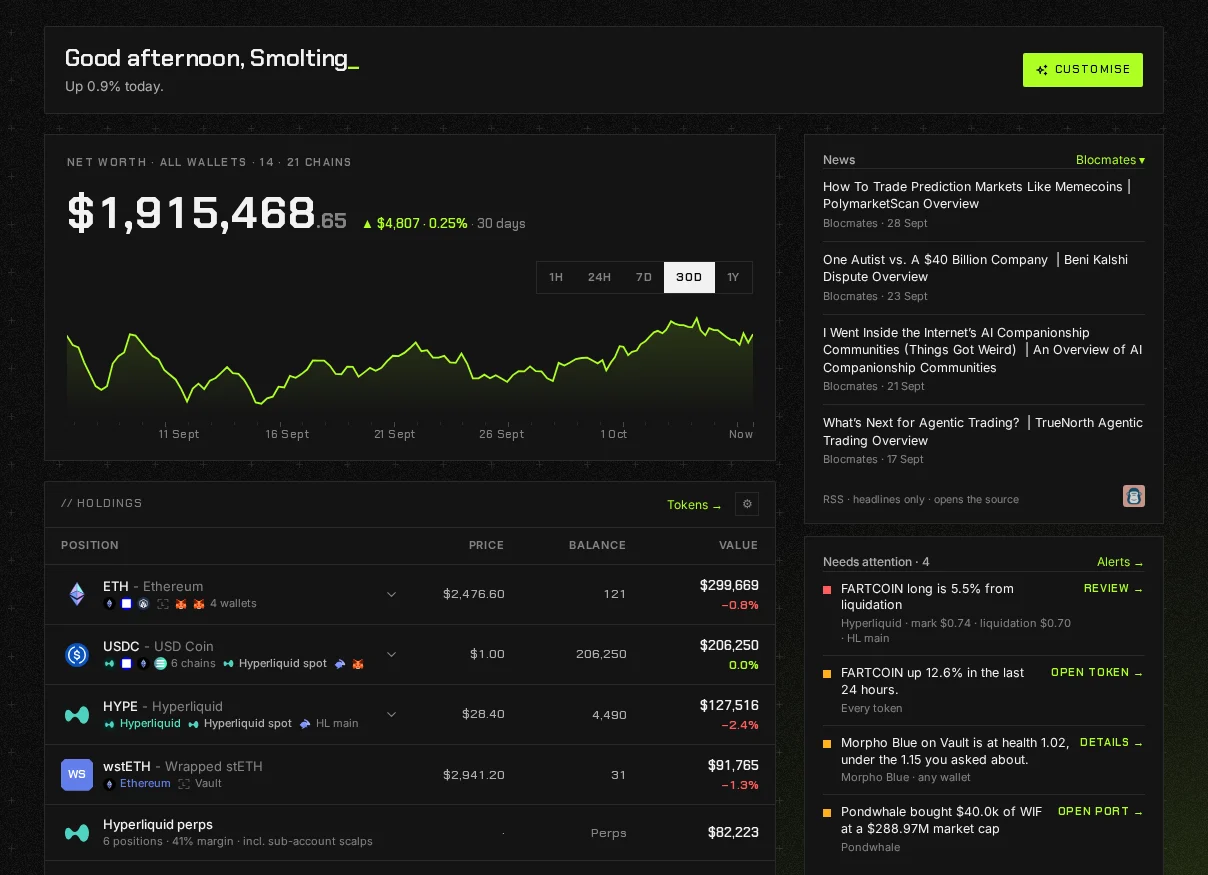
Net worth
Section titled “Net worth”The figure at the top is what the wallets in view are worth now. It adds up:
- every token priced from a market we can vouch for,
- every DeFi position, supply less borrow,
- balances held on a venue rather than a chain, such as Hyperliquid spot and staked HYPE,
- and perp equity, which can be negative.
It leaves out NFTs, which have their own floor total on the NFTs page, prediction markets, and anything priced from a market too thin or too stale to stand behind. The line under the holdings says exactly what was left out. What is not counted, and why explains each reason.
Above the figure, the label says which wallets it covers: the group in view, how many wallets, and how many chains they hold something on.
The chart
Section titled “The chart”Pick a range: 1H, 24H, 7D, 30D or 1Y. The change beside the figure is measured between the two ends of the line you are looking at.
- If the port is younger than the range, the label names the span the line actually covers and adds “all we have so far”, instead of pretending to cover the whole range.
- If a wallet was added partway through the range, no change is quoted and the line says “Not every wallet goes back this far”. A wallet arriving is not a gain.
- While a wallet is still on its first read, the chart waits and says how many are still being read.
Holdings
Section titled “Holdings”Under the chart is the holdings table: tokens in one half and DeFi and perp positions in the other, biggest first. Each row shows the price, how much you hold and what it is worth, with the day’s move underneath. Press a row to open the token or the position. The arrow beside the heading swaps which half comes first.
The cog sets how many rows Home shows, and the filters, which apply to every page that lists holdings:
- Hide small positions, under a figure you set.
- Show airdropped tokens, which is off by default.
- Show tokens with no pool behind them.
- Show tokens with no market.
Phishing tokens have their own switch, in the same filters opened from the Tokens and DeFi pages.
A hidden row is never silent. The line under the table counts what each switch is holding back, and a filter changes what you see, never what is counted.
Your cards
Section titled “Your cards”The rail on the right holds cards you choose. Press Customise to open the card library, then drag a card into the rail or under the holdings, or drag it back to the library to take it off. Each card has its own settings behind its cog.
A new port starts with News, Movers, By chain, Allocation, Needs you and Perps. The library also has Goals, Costs and yield, NFTs and Your notes.
The sidebar
Section titled “The sidebar”The pages are in three groups: Overview (Home, Today and Following, the ports you follow), Portfolio and Insights. DeFi, Perps, Predictions and NFTs are inside Positions, which opens and closes and stays the way you left it. Right click any entry but Home and choose Move to More to fold it away; it waits under More, with a count beside it if it holds something, and Show in the sidebar brings it back. Settings › Appearance › Sidebar has the same switches. The sidebar never changes by itself, and every page is still in search wherever it sits: ⌘K on a Mac, Ctrl+K elsewhere, or / on its own (every shortcut). Settings is the gear at the foot of the sidebar, and your public profile is in the menu under your picture.
Groups
Section titled “Groups”The picker at the top of the sidebar sets which wallets are in view. Pick a group and every figure on every page, the net worth included, covers only that group. See Groups, nicknames and notes.