Groups, nicknames and notes
Name a wallet, put it in a group, mark the app that holds it, leave yourself a note, or keep it out of your totals.
Everything about a wallet that you type yourself lives on the wallet’s Edit panel, on the Wallets page or the wallet’s own page. It is stored on your account, so every browser and the phone app see the same names and groups.
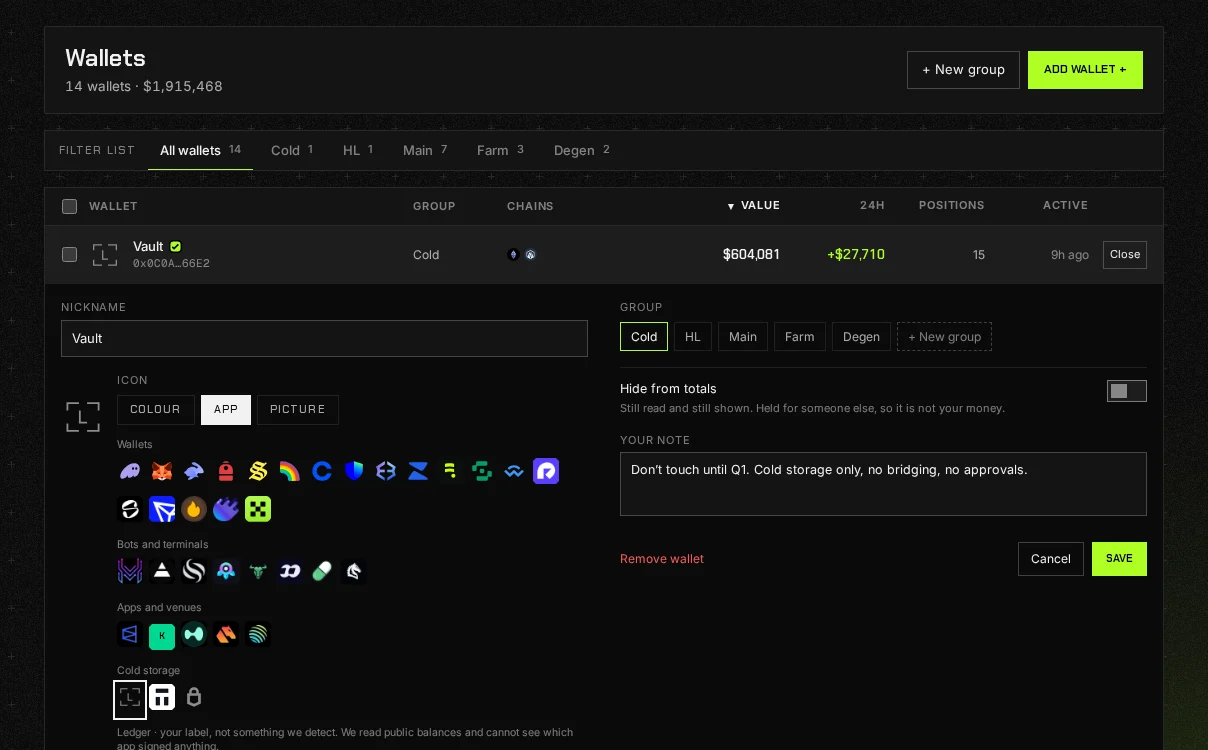
The Edit panel
Section titled “The Edit panel”- Nickname: what the wallet is called everywhere in Port_.
- Icon: a colour, the mark of the app that holds it (MetaMask, a Ledger, a trading bot), or a picture you upload, which is saved to your account with the rest. The app mark is your label; Port_ cannot see which app signs anything.
- Group: pick one, or + New group to make one.
- Hide from totals: the wallet is still read and still shown, and left out of every figure. For a wallet you hold for somebody else.
- Your note: a note only you see.
Press Save to keep the changes, or Cancel to drop them. Remove wallet takes it out of your port.
Groups
Section titled “Groups”The Wallets page has a tab for every group, and Manage groups beside Add wallet. The picker at the top of the sidebar sets the group in view, and every figure on every page, net worth included, then covers only that group.
Manage groups (also in the group picker, and ⌥⇧G on a Mac, Alt+Shift+G elsewhere) opens the Groups page: every group with how many wallets it holds, what they are worth and the day’s move, and the wallets in no group on their own line. Make a group there, or open one to rename it, remove it, or tick the wallets that belong in it and press Save. Removing a group leaves its wallets in place, in no group.
Pro Groups are part of Pro: on Free the group tabs, Manage groups and ticking wallets are not shown. To group many at once, tick the wallets on the Wallets page and pick the group once, or tick them on the group’s own page.
A pasted list or an imported file can carry a nickname and a group on each line, and a group named there is created for you. See Importing a file.
Many wallets at once
Section titled “Many wallets at once”Pro Tick wallets on the Wallets page and a strip above the list offers three things:
- Move to group: one group for all of them, or a new one named on the spot.
- Move to Following: they leave your port and become a followed port, a new one or one you already follow. They stop counting in your net worth and their moves land in your feed. Nicknames come along; notes, groups and pictures do not. A followed port holds up to 20 wallets, and they count toward your follow limit. See Following.
- Remove: takes them all out of your port after one confirmation, with Undo for a few seconds afterwards. Nothing on chain changes.
Hiding rows
Section titled “Hiding rows”Tokens, DeFi accounts and NFT collections can each be hidden from their own pages. A hidden row leaves the page and its totals, and nothing is deleted. Settings › Hidden by you lists everything you have hidden, with Bring back beside each.