Alerts
Rules you write as a sentence, checked on our server, delivered to the inbox, your browser, the phone app or email.
Alerts are on every plan: three rules on Free, 100 on Pro, and more above. The rule cap is the only difference, and the server says it when a rule is refused.
The Alerts page has two tabs: Inbox, what needs you, and Rules, what you asked to be told.
The inbox
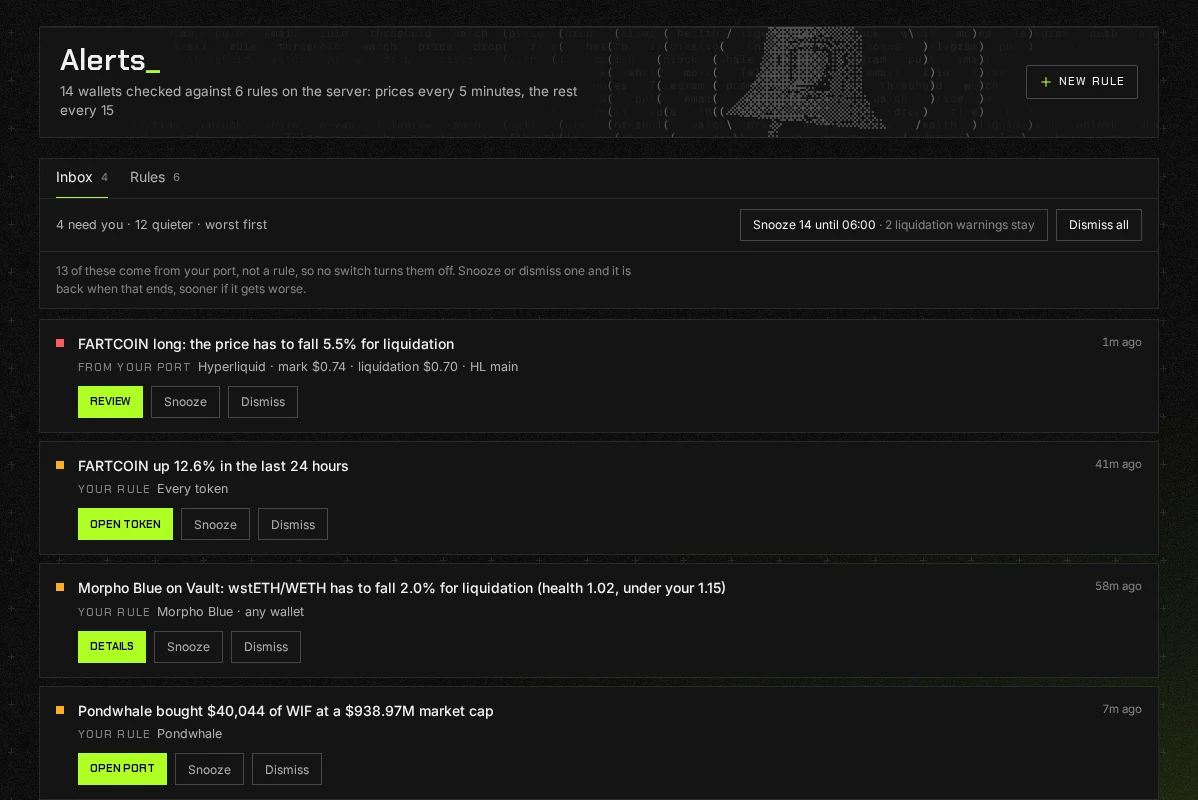
Section titled “The inbox”The inbox holds two kinds of item. Some are worked out from your port with no rule at all, such as a position near liquidation. The rest are rules you wrote that fired. Each says which it is, and has a button to the page it is about, Snooze and Dismiss:
- Snooze puts an item away until your next briefing hour.
- Dismiss marks an alert your rules sent as read, for good. Something worked out from your port was sent by nothing, so Dismiss puts it away for 30 days.
Anything from your port that you snooze or dismiss comes back sooner if it gets worse. The line above the inbox counts what is snoozed and what is dismissed, and shows them, each with its way back.
To deal with a long list at once, the web snoozes everything until your next briefing hour, and Dismiss all, on the web and on both of the phone’s alert screens, dismisses everything: every alert your rules sent, however many there are, and what was worked out from your port. It takes two presses, and the first says what it takes. Neither takes a liquidation warning or anything in danger. Those stay on their own row, and each says how many stay before it acts.
A loan that a liquidation could take less than $1 from never warns, such as the interest left owing when a loan is repaid to the cent. Only figures we stand behind decide that, so a loan we cannot price still warns. The DeFi page still lists it, with its health.
Writing a rule
Section titled “Writing a rule”- Press + New rule.
- Pick what to watch. The chips fill from what your port holds.
- Type the figure, pick where it goes and how often, and read the sentence back in the preview.
- Save. The rule is armed straight away.
The kinds of rule:
- Price crosses
- Price moves %
- Port value
- Health factor
- Funding flips
- Claimable
- Wallet receives / sends
- Position PnL
- Maturity
- Someone I follow
- Confluence
A token’s own page has an Alert button that opens a price rule for that token.
How often a rule is checked
Section titled “How often a rule is checked”Our server checks price moves and port value rules every 5 minutes, and the rest every 15, whether or not you have Port_ open. A rule on a port you follow is checked the minute one of its moves arrives. How often one rule may tell you is yours to pick: once per crossing, every time, max once a day, max once a week.
Where alerts go
Section titled “Where alerts go”The inbox always has them. Beyond that, each rule says where it goes:
- Push to every browser where you have allowed notifications, and to the Port_ app on your phone. A device is reachable only while you are signed in on it.
- Email, with a daily cap.
- Telegram, through a bot of your own, once you connect it in Settings. See Following › Telegram.
- Discord, Slack or a webhook of your own, on Pro+ and Ultra. See Alerts to Discord, Slack and a webhook.
- The morning briefing only, for things that can wait.
The Where alerts go panel on the page shows which browsers and phones are set up.
What it will not do
Section titled “What it will not do”- Act on an alert. Port_ is read only; an alert tells you, and the rest is yours.
- Fire a rule it cannot check. A rule waiting on something unbuilt says so under it and stays saved.