DeFi
Lending, liquidity, staking and vault positions across the wallets in view, grouped by protocol, with how close anything borrowed is to liquidation.
The DeFi page shows what your wallets have inside protocols: deposits and borrows on lending markets, liquidity positions, staking and vaults, plus balances held on a venue such as Hyperliquid. Protocol positions are read from each protocol’s own contracts and venue balances from the venue, so there is nothing to connect: a wallet that holds a position shows it.
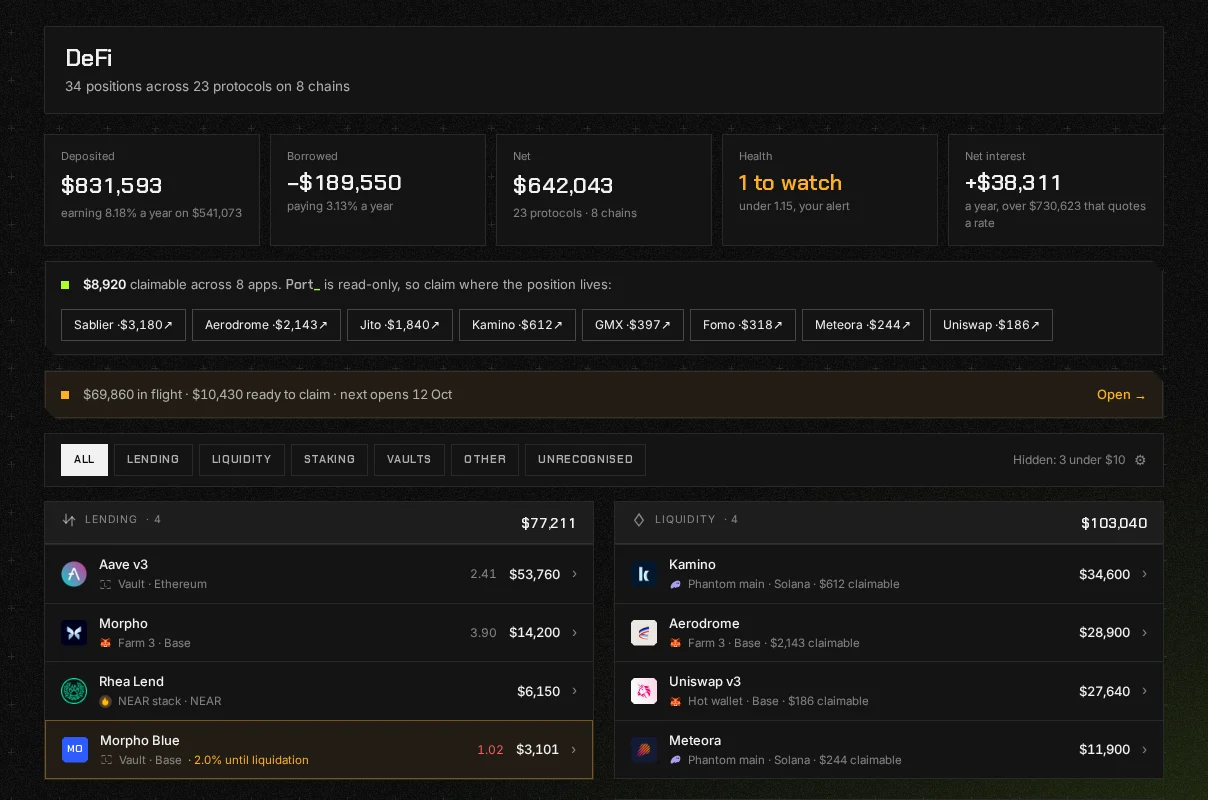
The figures across the top
Section titled “The figures across the top”- Deposited: everything supplied, and what it earns a year where the protocol quotes a rate.
- Borrowed: everything owed, and what it costs a year. Shown with a minus sign, never in red: a borrow is a position you chose, not a loss.
- Net: deposited less borrowed, across how many protocols and chains.
- Health: the account closest to liquidation, or how many are under the level you watch. The level is your own health factor alert if you have one, and 2.0 if you do not.
- Net interest: what the port earns less what it pays in a year, in dollars. Shown only when something quotes a rate, and it says how much of the port that covers.
If rewards are waiting, a banner says how much is claimable and in which apps, with a link to each. Port_ is read only, so claiming happens where the position lives.
Protocols and accounts
Section titled “Protocols and accounts”The page groups positions into sections, Lending, Liquidity, Staking, Vaults, Other and Unrecognised, with a row per protocol inside each. Press a protocol to see its accounts: one protocol, on one chain, in one wallet. Inside an account are its positions, its health factor and, for a borrow, how far the price can move before liquidation.
Other holds positions we understand that fit none of the four kinds, such as a balance held on a venue. Unrecognised holds positions we can see and cannot yet interpret. They are listed and never hidden or valued at zero.
Once there are more than three accounts, or anything unrecognised, chips above the list show one kind at a time. Supported protocols lists every protocol Port_ reads.
In flight
Section titled “In flight”Some money is on its way somewhere and cannot be touched yet: a cooldown such as Ethena’s, an unstaking queue such as Lido’s or Hyperliquid’s, a stream or vesting plan such as Sablier’s, a DCA order still selling down, or tokens locked for a set time. When any of your positions is one of these, a strip above the sections says how much is in flight, how much is ready to claim and when the next one opens. Press it for the In flight page, which lists them all in one place. The strip only appears when there is something on the page.
Each row is in one of three states:
- Ready: it has finished and is waiting for you to claim or withdraw it, because the protocol says so or its date has passed. These come first, with how long they have been ready, because this is the money that needs you to do something.
- Waiting: the protocol states a date, so the row says when it opens, with a bar where the protocol also states how far through it is. A stream or a DCA order says when it finishes instead, because it pays out a little at a time rather than all at once.
- Undated: the protocol states no date, so the row carries the protocol’s own word, such as “In the queue”, and no bar. A Lido withdrawal finishes when Lido’s oracle says the ether has arrived, and SOL that is deactivating finishes at an epoch boundary, and neither states a day in advance. A date or a bar we worked out ourselves would be a guess shown as a fact.
Everything on the page is already counted in your net worth and still sits in its account above. The page is a second way of reading the same positions, ordered by when they open, and it changes no total. Press a row to open its account, where the link to claim it is.
Hiding an account
Section titled “Hiding an account”Under each account are two buttons: Open on the protocol, which takes you to where the position lives, and Hide. A hidden account leaves the DeFi page and every total it was in, and nothing is deleted. The page says how many you have hidden, and the Hidden by you switch brings them back into view.
What it will not do
Section titled “What it will not do”- Claim, repay or move anything. It reads positions and links you to the protocol.
- Quote a blended APY. A single percentage across deposits and debt has to be a percentage of something, and whichever base is picked is wrong for half the ports that read it, so the page gives dollars a year instead.
- Price a receipt from a market. A token a protocol issues for your deposit is valued against the protocol it redeems from, never from whatever pool happens to quote it.